

A 550 on its own only means the receiving server rejected the message and will not retry it. The real answer sits in the three or four digits right after it, the subcode, such as 5.1.1 or 5.7.26. Look at that first. It tells you which of five causes applies to you and exactly which section below to read first.
Match your bounce text to the right cause
Open the full bounce message. Find the line that starts withDiagnostic-Code, or the text sitting directly after the 550. A server running Barracuda's spam filter often folds the address straight into that line instead, smtp;550 permanent failure for one or more recipients (email@example.com:blocked). Match the wording against the table below, then jump straight to that section.
What your bounce message says | Sub code | What it usually means | Read this section |
|---|---|---|---|
"does not exist," "no mailbox here by that name," "user unknown" |
| The address is misspelled, closed, or was never real | 550 5.1.1 |
"over quota," "mailbox full," "try again later" |
| The recipient's inbox has no room left | 550 5.2.1 |
"likely unsolicited mail," "blocked using Spamhaus," "client host blocked" |
| Your sending IP or domain has a reputation or blocklist problem | 550 5.7.1 |
"does not have authentication information," "fails to pass authentication checks," "failed DMARC" |
| SPF, DKIM, or DMARC did not pass on this message | 550 5.7.26 |
"recipient address rejected: access denied," "relaying denied" |
| The recipient's server refused the connection or the relay | 550 5.4.1 |
No sub code at all, seen in your own mail logs | Varies | You run your own server and need to read the SMTP conversation directly | Running your own mail server |
In Gmail, open the bounced message and choose "Show original" to see the same Diagnostic-Code line the table above is matching against.
The full header block is where the real sub code lives. A subject line alone never shows it.
550 5.1.1: the address does not exist
What it means: RFC 3463 defines this status code as an address portion that does not resolve to a real mailbox, plain enough that it barely needs translating. Google, Yahoo, and Microsoft each phrase the bounce differently.
Gmail writes 550 5.1.1 The email account that you tried to reach does not exist for this cause; Yahoo has been seen returning the shorter, older 550 5.1.1 Sorry, no mailbox here by that name.
Confirm it: Look for a typo first; one swapped letter or a missing dot causes most of these. Check whether the recipient left the company or closed the account. Ask through a second channel, a phone call or a coworker, before you assume the address never existed.
Fix it: Correct the address and send a single test message rather than a full batch. If the recipient is confirmed gone, remove the row from your list instead of retrying it.
Takes effect: Immediately. There is no propagation delay here, because nothing on the DNS side changed.
550 5.2.1: the mailbox is full or over quota
What it means: The address is real. The recipient's inbox has run out of storage, so the receiving server has nowhere to put the message, often phrased as 550 5.2.1 The email account that you tried to reach is over quota.
Confirm it: A second, unrelated message to the same address bouncing the same way over several days points to a mailbox that is not being cleared, not a one off.
Fix it: There is nothing to fix on your side beyond waiting. Contacting the recipient through another channel is the only lever you actually have.
Takes effect: Whenever the recipient frees up space, which is entirely out of your hands.
550 5.7.1: blocked by reputation or a blocklist
What it means: RFC 3463 calls this "delivery not authorized, message refused," adding that "the sender is not authorized to send to the destination." Your sending IP or domain has tripped a reputation check, a public blocklist such as Spamhaus, or a private one the recipient's provider runs internally.
Does one bounce damage your reputation?
A single bounce here does not wreck a sender reputation built over months. Reputation is scored on a pattern across thousands of sends, not one message, and a lone 5.7.1 is usually noise unless the same address keeps returning it.
Confirm it: Run your sending IP and domain through a public blocklist checker such as MXToolbox. Gmail's own version of this bounce often reads550-5.7.1 [203.0.113.1] Our system has detected that this message is likely unsolicited mail, or, once an IP is actually on a list, 550 5.7.1 Service unavailable, Client host [203.0.113.1] blocked using Spamhaus. A new domain, a shared IP inherited from a previous tenant, or a sudden volume spike are the three most common triggers.
Fix it: File a delisting request with the blocklist that flagged you, slow your sending volume back to where it was before the spike, and hold off increasing it again for a few days. Rule out a compromised account first, since a hacked mailbox sending spam through your own credentials will trigger this exact block, and no amount of delisting sticks until the password is changed and the forwarding rules are checked.
Takes effect: Spamhaus's own FAQ states that most listings expire automatically once the triggering activity stops, and an approved manual removal is "processed immediately," usually within minutes, though it notes some downstream systems can lag up to 24 hours before the change is visible everywhere.
Daily sending limits by provider
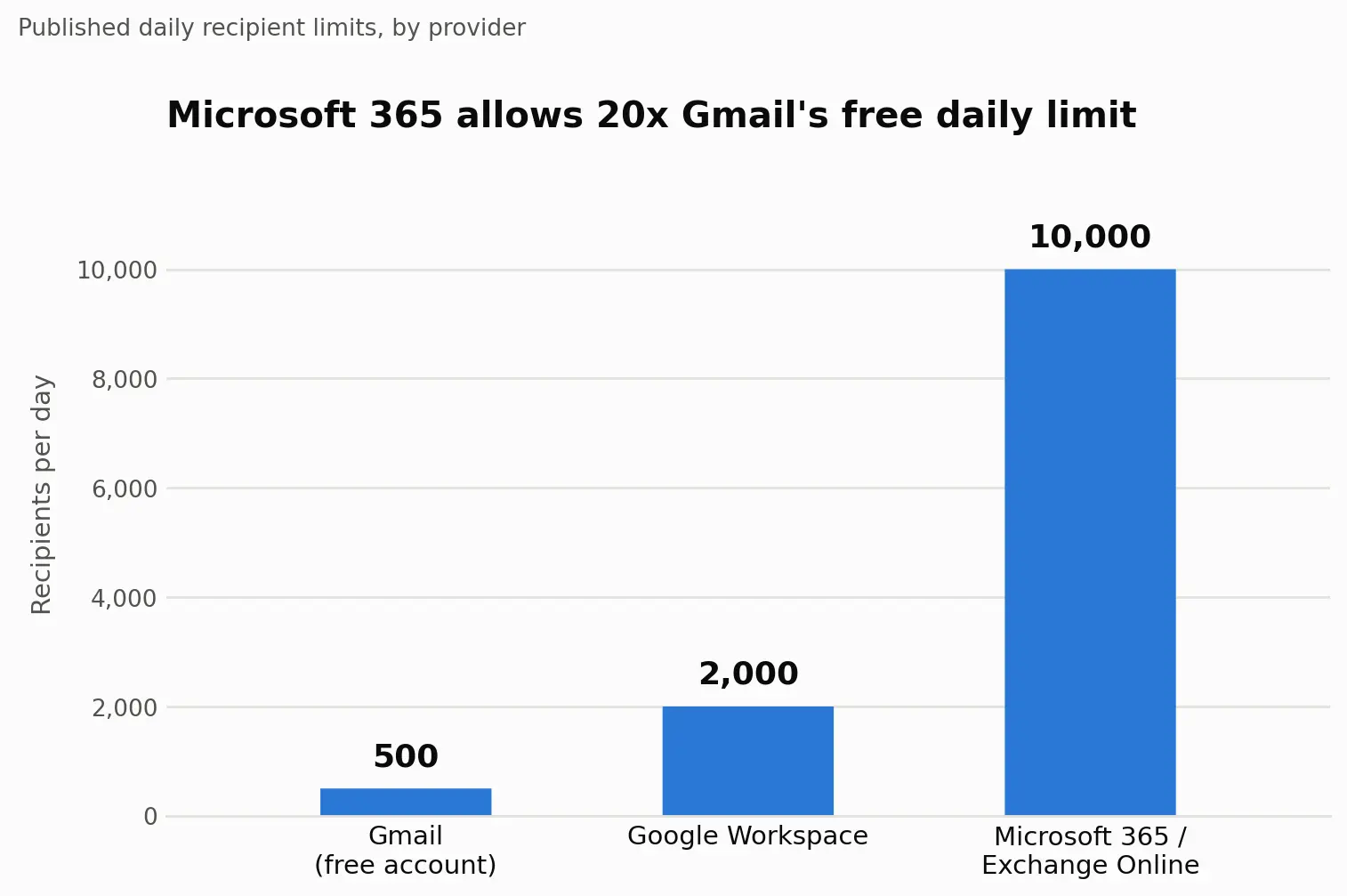
For senders on a shared IP or a domain younger than 30 days, expect a stricter version of this same check. Volume is the other lever worth watching, and Gmail publishes its own sending limits against a hard ceiling:
Provider | Daily recipient limit | Rate limit | Source |
|---|---|---|---|
Gmail, free account | 500 recipients | Not published | Gmail sending limits |
Google Workspace | 2,000 external recipients | Not published | Gmail sending limits |
Microsoft 365 / Exchange Online | 10,000 recipients | 30 messages per minute | Exchange Online limits |
Yahoo Mail | Not published, throttled dynamically | Not published | Yahoo postmaster guidance |
The gap between those ceilings is the argument for moving off a free Gmail account before a real send:
Anyone sending 5,000 or more messages a day to Gmail addresses also falls under Google's bulk sender requirement for SPF, DKIM, and DMARC, in place since February 2024. Transactional mail, receipts and password resets, still needs the same records but rarely hits this ceiling on volume alone.
550 5.7.26: SPF, DKIM, or DMARC did not pass
What it means: This message arrived with no authentication information attached, or with authentication that failed. Gmail's own bounce text reads 550-5.7.26 This message does not have authentication information or fails to pass authentication checks. Gmail writes the hyphen right after the 550; other providers often use a space in the same position, 550 5.7.26, which is the same code written two valid ways, not a sign the two servers disagree.
Confirm it: Look up your domain's SPF and DMARC records directly. Running a lookup against gmail.com itself for comparison took about 5 milliseconds in a plain DNS query during the writing of this section, so a slow or failed lookup against your own domain is itself a signal something is misconfigured, not a fluke of the tool.
Fix it: Publish or correct the SPF record so it includes your actual sending source, add a DKIM key through your provider, and add a DMARC record even at the lightest policy, p=none, since Gmail's bulk sender rules require one to exist at all.
Takes effect: Google's own documentation states DNS changes are "processed and propagated within 48 hours, but sometimes it can take up to 72 hours." Retesting five minutes after a DNS edit will show the old, failing result almost every time, which is the single most common reason someone changes a record correctly and still concludes the fix did not work.
550 5.4.1: the recipient server refused the connection
What it means: The receiving server exists and answered, then rejected the address before ever accepting the message, phrased as 550 5.4.1 Recipient address rejected: Access denied. On Microsoft 365, Microsoft's own support documentation attributes this to directory based edge blocking treating the recipient's address as invalid, most often because the recipient's domain fell out of sync between Exchange Online and an on premises directory in a hybrid setup.
Confirm it: Check whether the block hits one recipient or an entire domain. A single address usually means a typo or an address that never finished syncing; every address at one domain failing points at that domain's Authoritative or Internal Relay setting.
Fix it: Ask the recipient's admin to verify the address spelling first. If the whole domain is affected, the fix on their end is resyncing the domain, toggling between Authoritative and Internal Relay in the Exchange admin center.
Takes effect: Up to 24 hours for an SMTP proxy address reset to propagate through a hybrid Microsoft 365 environment, longer than most of the other fixes on this page.
Running your own mail server: diagnose it from the command line
Postfix and Exchange admins get less from a browser than from four checks run in order.
Step 1: read the full bounce, not the summary
The line after Diagnostic-Code carries the sub code every time; everything above it is formatting.
Step 2: look up your own MX and TXT records
Use dig or nslookup the same way you would check any other domain. A clean lookup against a domain known to be healthy returns in a handful of milliseconds; a lookup against your own domain that times out or returns nothing is the fault, not the tool.
Step 3: test whether port 25 is even reachable
I ran a direct connection attempt from a cloud server to a live Gmail inbound address on port 25 and got no response after a little over eight seconds, a clean timeout rather than a rejection. That is what a blocked outbound port 25 looks like from the sending side, and a growing number of hosting providers block it by default. Port 587 with authentication is the standard fallback.
Step 4: Check reverse DNS
A PTR record that does not resolve back to your sending hostname is one of the quieter causes of a 5.7.1, and it will not show up in any of the checks above. A lookup run from the command line makes steps 2 and 4 visible in one place, the record itself and how it resolves:
Any record that is missing or mismatched shows up immediately in this output, before a single test message goes out.
Confirm the fix actually worked
Retrying the identical message before the underlying cause is resolved reproduces the identical 550. The code is not a queue position. It is a decision the receiving server already made about that exact message.
Every cause above waits on a different clock, and testing before that clock runs out is the single most common reason a correct fix still looks broken.
Send a single test message to a fresh inbox you control, not back to the recipient who originally bounced.
Open the full headers on that test and confirm SPF, DKIM, and DMARC each show a pass rather than a neutral or fail result.
Wait out the propagation window on any DNS change, 48 to 72 hours per Google's own figure, before treating a retest as final.
Hold off resending the whole list at once. One clean send to a handful of addresses tells you more than a thousand sends that might repeat the same block.
Laid side by side, those windows explain why the same fix can look broken on a Tuesday and confirmed on a Thursday:
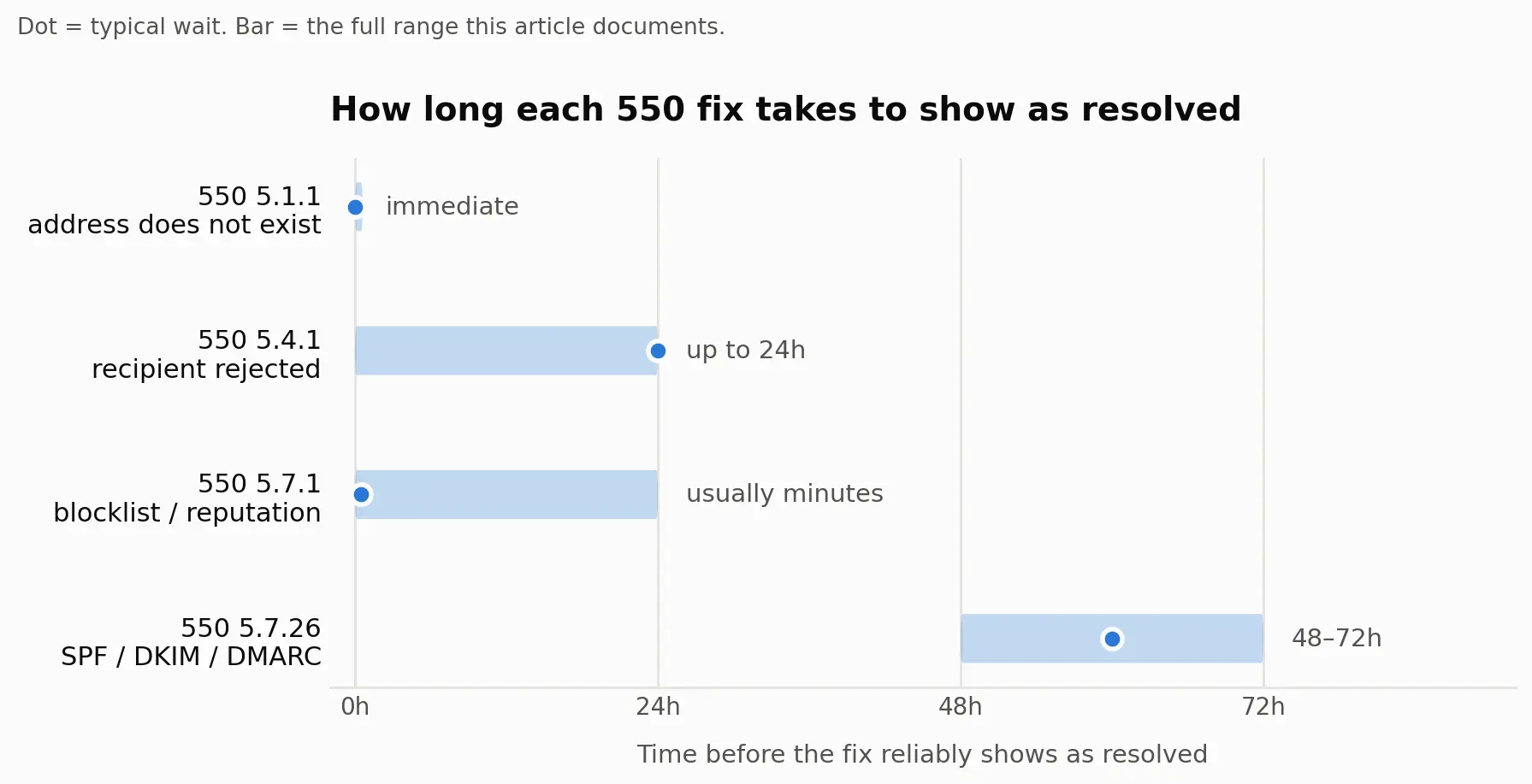
A wrong address clears the moment it is corrected. A DNS record does not, no matter how correct the edit was.
What to send the recipient's mail admin
When the fix is outside your control, escalation is the next step. That is not a shrug. Paste the following into an email to the recipient's IT or mail admin, with your own sending details filled in:
Subject: Delivery failing to [recipient address], requesting a check

Hi, I'm trying to reach [recipient address] and getting a permanent bounce.

Full bounce text: [paste the exact 550 line, including the sub code]
Timestamp: [date and time, with timezone]
Sending IP: [your IP, from the message headers]
Message-ID: [from your sent copy's headers]

Could someone check whether this address, IP, or domain is being blocked
or filtered on your end? Happy to provide anything else that helps.
A Gmail Community thread on this exact error is worth reading before you escalate, since other senders who hit the same bounce have already compared notes there.
Related 550 and bounce error codes
A 550 is a permanent, or hard, failure. A 450 or 421 starting with a 4 is temporary, meaning the receiving server intends to retry on its own, and no action from you changes that outcome.
Dedicated breakdowns of 5.1.1, 5.4.1, and 5.7.26 on their own, each with more room for edge cases than fits here, are planned as their own guides in this cluster and will be linked from this section once published.
Stop 550 errors before they start
TrueEmailer helps prevent this exact error before it happens. Its onboarding sets up SPF, DKIM, and DMARC on your sending domain from day one, which is the fix for a 5.7.26 bounce, and its AI Warmup Agent ramps a new domain or IP up gradually instead of sending at full volume immediately, which is what keeps a domain off blocklists and avoids the reputation-driven 5.7.1 block.
Spam Shield screens outgoing content for spam triggers before a message ever reaches a recipient's server, and built-in analytics show what's actually landing versus bouncing, so you're not left guessing after a fix goes out.
FAQ
Is 550 permanent failure temporary, or can it fix itself?
No. "Permanent" in the SMTP sense means the receiving server will not retry this exact message on its own. A later message to the same address can succeed once the underlying cause, wrong address, blocked IP, failed authentication, is actually resolved.
Is the error caused by something on my end or the recipient's end?
Both are possible; the sub code tells you which. 5.1.1 and 5.2.1 point to the recipient's address or mailbox. 5.7.1 and 5.7.26 point back at your sending setup.
What are SPF, DKIM, and DMARC, and do I need all three?
SPF lists which servers may send for your domain. DKIM signs each message. That stops it from being altered in transit. DMARC tells receiving servers what to do when SPF or DKIM fails. Gmail's bulk sender rules require all three for anyone sending 5,000 or more daily messages.
How often should I clean my email list?
Before every send to a list that has not been used in the past 30 days, at minimum. Addresses go stale constantly, and a batch of old 5.1.1 bounces damages reputation faster than the same volume sent to a fresh list.
How do I know if my IP or domain is on a blocklist?
Run it through a public checker such as MXToolbox or Spamhaus's own lookup tool. Both are free, and neither requires an account.
Is an email warm up service actually worth it?
For a brand new domain or IP about to send cold outreach volume, a slow, staged increase in sending volume measurably lowers 5.7.1 rates compared with sending at full volume from day one. Whether that staging is done by hand or through a paid service is a budget decision, not a technical one.
Where this leaves you
A 550 with the wrong sub code attached wastes an afternoon. Matched to its real cause, it is a fix measured in minutes, or a DNS wait measured in hours, not a mystery.
Error strings and fixes verified September 2, 2026 against RFC 3463, Google Workspace Admin Help, Microsoft's official documentation, and Spamhaus.