

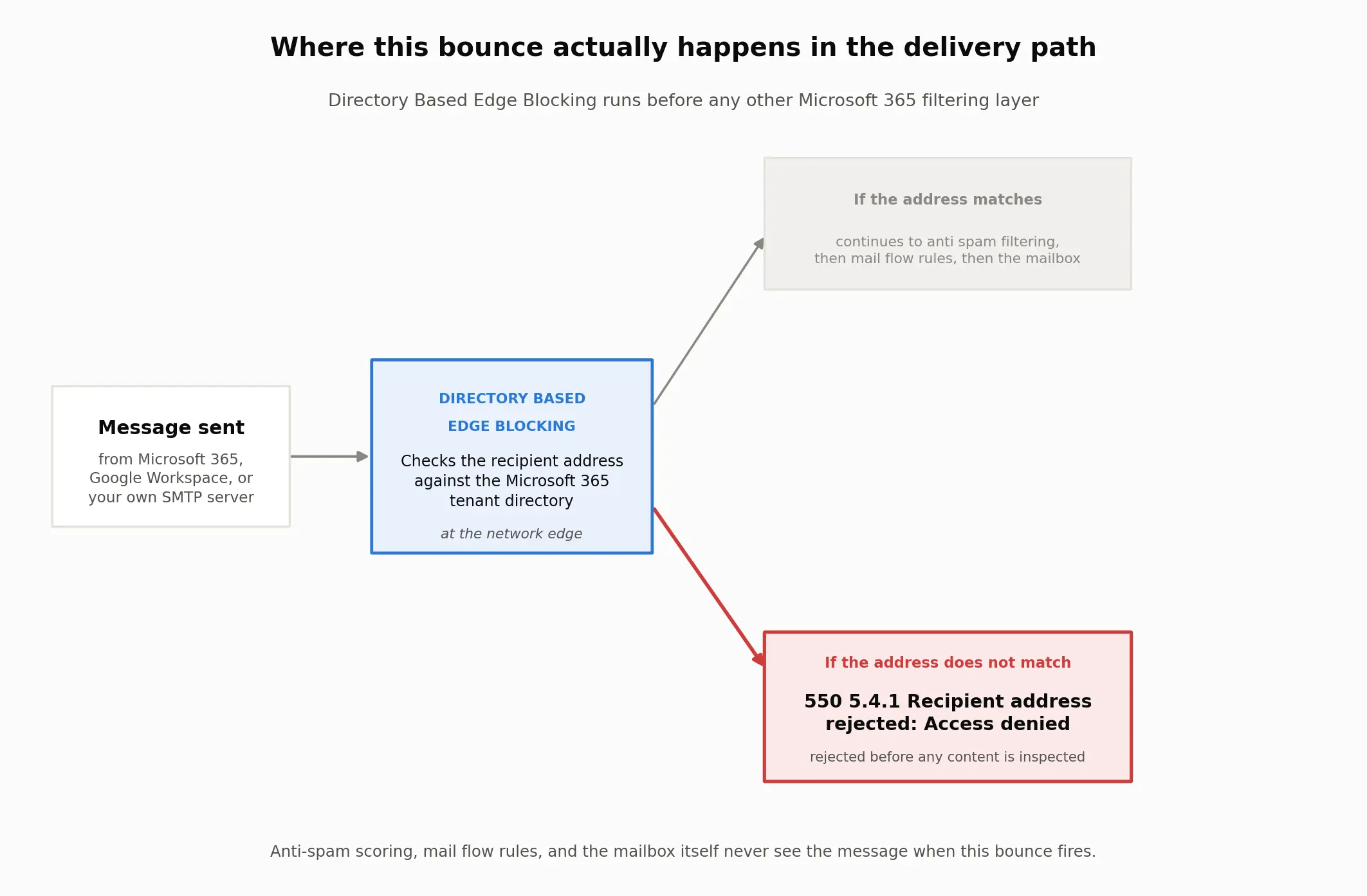
This bounce means Microsoft 365 rejected the recipient address at the network edge before your message reached a mailbox or a spam filter, exactly as Microsoft's own reference for this NDR code describes it.
In most cases, the recipient's own Microsoft 365 administrator has to fix it, not you: the address either does not exist yet in their tenant, has not synced from an on premises server, or sits behind a domain setting that hasn't caught up with a recent migration.
Five distinct situations produce this exact string, and they are not equally common.
Which cause matches what you're seeing
Match your symptom to a row before you touch anything. Guessing wastes a retest cycle.
What you're seeing | What it points to | Read this section |
|---|---|---|
Only one address at that domain bounces; everyone else there receives fine | The recipient object is missing or unsynced | Cause 1 |
The address is a mailbox, alias, or shared mailbox created in the last day or two | Provisioning or sync delay, not a real invalid address | Cause 1 or Cause 2 |
Every address at that domain bounces, or it started right after a Microsoft 365 migration or MX change | Accepted domain type or migration sequencing | Cause 3 |
The address is a public folder or a distribution list, not a person's mailbox | Public folder or dynamic distribution group sync gap | Cause 4 |
Nothing changed on your end, it worked yesterday, or you suspect a blocklist | Sender side false alarm | Cause 5 |
Cause 1: the recipient isn't provisioned in the directory yet
What it means: Directory Based Edge Blocking, DBEB, checked the address against the recipient's Microsoft 365 directory and found no match, so it rejected the message at the service perimeter before anti spam or mail flow rules ever ran. Microsoft's own mail flow documentation describes the mechanism plainly: "DBEB lets you reject messages for invalid recipients at the service network perimeter."
That is the entire rejection, in one sentence, and it happens before content is ever inspected, which is why checking your own sending reputation rarely explains it.
Confirm it: Ask the recipient whether that exact mailbox, alias, or shared mailbox exists in their tenant, and whether it was created recently. A brand new object is the single most common match for this pattern, ahead of an actual typo.
Fix it: The recipient's Microsoft 365 administrator adds or corrects the object as a valid recipient. There is no sender side equivalent, on any platform. You cannot create a mailbox in someone else's directory.
Takes effect: Microsoft Entra Connect Sync runs its directory sync on a 30 minute cycle by default. Once the recipient object is correct on their end, allow up to that window before retesting the identical address rather than assuming the fix failed.
Cause 2: a hybrid Exchange sync gap
What it means: The mailbox actually lives on premises in a hybrid Exchange deployment, and the object has not replicated to Exchange Online yet, so the cloud directory still treats it as invalid even though it exists.
Confirm it: The organization runs Exchange hybrid, and the specific mailbox was moved, renamed, or newly created on the on premises server recently rather than directly in the cloud.
Fix it: The recipient's administrator reruns directory synchronization, confirms Microsoft Entra Connect processed the object cleanly, and checks the remote routing address on the on premises mailbox, since a wrong routing address produces this identical bounce.
Takes effect: The standard 30 minute sync cycle applies here too, though a full hybrid resync after a configuration change can run past one cycle. If the object still will not resolve after two full cycles, that points to a sync error worth investigating directly rather than more waiting.
Cause 3: accepted domain type or migration sequencing
What it means: This is the domain wide version. Every recipient at that domain bounces, because the accepted domain in Exchange Online is set to a state that does not match how much of the domain has actually finished migrating.
Confirm it: Every address at the domain fails with the identical string, and the failure started right after a Microsoft 365 migration project or an MX record change, not gradually over time.
Fix it: Open the accepted domains list in the Exchange admin center and check which type this domain is set to right now, since almost nobody checks it until mail starts bouncing. That Domain type column is the fastest way to confirm which state the domain is actually in, since the interface gives no outward warning that it's wrong. The recipient's administrator keeps the domain set to Internal relay until every valid recipient has been added to Exchange Online, then switches it to Authoritative only once migration is complete, matching Microsoft's own accepted domain guidance for this exact sequencing.
Takes effect: The domain type change applies quickly, but Microsoft's own documentation notes infrequent instances where invalid addresses still relay through immediately after a switch to Authoritative. Confirm with one real test message rather than assuming the change is instant.
Cause 4: a public folder or a dynamic distribution group
What it means: Mail enabled public folders and on premises dynamic distribution groups do not sync to Exchange Online the same way an ordinary user mailbox does, so DBEB can reject a perfectly valid group address as though it does not exist.
Confirm it: The failing address is a public folder or a distribution list, not a person, and mail to it may pass through a signature or compliance add in before reaching Exchange Online.
Fix it: For an on premises public folder, the administrator enables the Exchange mail public folders option inside Microsoft Entra Connect's optional sync features. For a dynamic distribution group in a hybrid setup, since dynamic groups cannot sync to Exchange Online at all, the administrator creates a matching mail contact directly in the cloud instead.
Takes effect: Public folder sync rides the same 30 minute cycle as everything else. The mail contact workaround for a distribution group takes effect as soon as that contact object replicates, usually within one cycle.
Cause 5: a sender side false alarm
What it means: The exact phrase in this bounce is "Access denied," a directory rejection, not a reputation phrase or a blocklist notice. An IP or domain reputation problem is the first thing most senders suspect, and it is rarely the actual cause behind this particular string.
Confirm it: The bounce reads "Access denied" rather than language about reputation, spam, or a blocklist, and it affects specific addresses rather than every message you send to that provider.
Fix it: There is nothing to fix on the sending side for this specific bounce, because it is a recipient directory issue rather than a sender reputation issue. If unrelated domains also start rejecting your mail with different wording, treat that as its own reputation problem, covered separately under the related 550 5.7.1 blocklist bounce, not this one.
Takes effect: Immediate, once you have confirmed which bounce you are actually reading.
Sender situation changes the workaround, not the cause
If you're sending from | What's different | What to do |
|---|---|---|
Google Workspace or Gmail | Same bounce, same underlying cause; the problem sits entirely on the recipient's Microsoft 365 directory | Skip anything involving your own domain's SPF, DKIM, or DMARC records; they are not the trigger here |
Microsoft 365, to another Microsoft 365 tenant | You may reach the recipient's administrator directly through a shared channel instead of a generic support form | Ask them to check the exact object first, before either side touches DNS |
Your own SMTP server or a cold outreach platform | The diagnostic text is the only evidence that gets you past first line support | Preserve the complete non delivery report first |
A domain that migrated to Microsoft 365 recently | Migration sequencing, Cause 3, is more likely than a single missing object | Ask whether the accepted domain type switched to Authoritative before migration finished |
High volume sending to many addresses at once | A reputation problem can look similar but is a different 550 code | Check that the bounce text says "Access denied" before assuming this guide applies |
Confirm the fix actually worked
Open the Exchange admin center as the recipient's administrator, not as the sender.
Go to mail flow, then message trace, and search the exact recipient address across the last 7 days.
Open the specific rejected message and read the detailed trace, not only the summary status.
Note which component actually rejected it. DBEB, a transport rule, and a connector each leave a different trace entry, and assuming DBEB again without checking wastes the retest.
Retest with the identical address once the object or domain change has had a full 30 minute sync cycle to replicate.
A message that goes through on retest, with the identical address and identical content, confirms the directory side fixed it. A message that bounces with a different error text means you found a second, unrelated problem, not a failed fix.
What the receiving server actually logged
Every cause above comes down to the same four step path, and where it breaks:
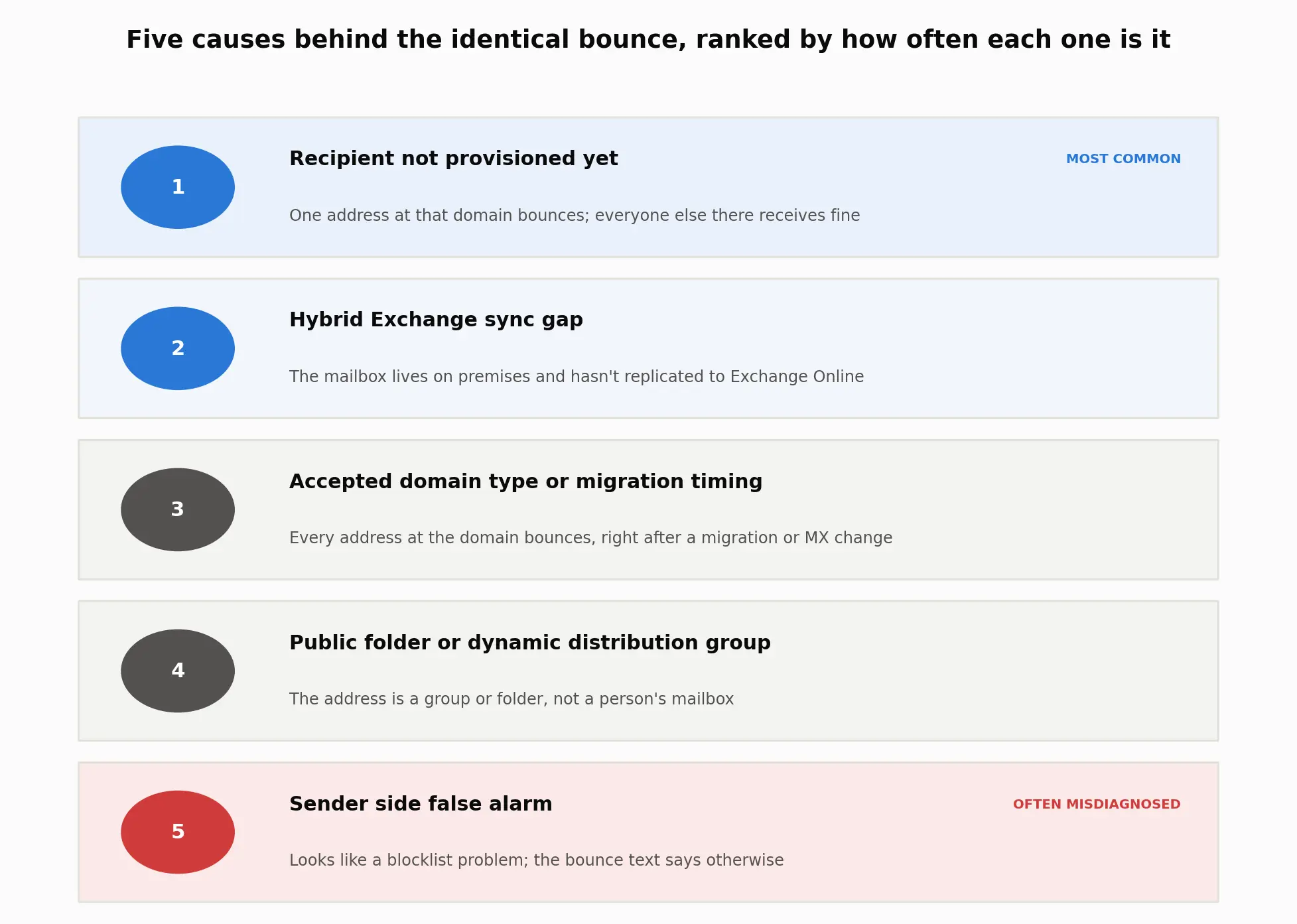
Anti spam scoring, mail flow rules, and the mailbox itself never see the message when this bounce fires. Everything below is what that rejection actually looks like on the wire.
The exact strings you'll see
Every real version of this bounce carries the same core pieces. Match yours against these before assuming a typo in your own copy:
550 5.4.1 Recipient address rejected: Access denied550 5.4.1 Recipient address rejected: Access denied. AS(201806281)550 5.4.1 Recipient address rejected: Access denied. AS(201806281) [DB5EUR01FT018.eop-EUR01.prod.protection.outlook.com]smtp;550 5.4.1 Recipient address rejected: Access denied. AS(201806281) [CO1NAM11FT059.eop-nam11.prod.protection.outlook.com]Some mail clients truncate the string to Remote Server returned '550 5.4.1 Recipient address rejected: Access denied with no closing text at all.
A small number of older reports show 550 4.3.1 in place of 5.4.1 with the same "Access denied. AS(201806281)" tail; treat that as the same underlying rejection under a slightly different code.
Decode the pieces
Term | Plain meaning | Why it matters |
|---|---|---|
| The SMTP reply code for a permanent failure | Retrying the identical message unchanged wastes another attempt |
| An enhanced status code Microsoft has repurposed for this specific directory rejection | The code's original RFC definition describes an unrelated network timeout, so generic advice written for that RFC meaning does not apply here |
| The plain text Microsoft appends when Directory Based Edge Blocking does the rejecting | It separates this bounce from a full mailbox or a blocklist bounce, which use different wording entirely |
| An internal identifier for the DBEB rejection rule itself | It is not a case number or a lookup code; searching it alone will not surface a status page |
DBEB | Directory Based Edge Blocking, the Exchange Online feature checking incoming addresses against the tenant directory | It is the actual mechanism doing the rejecting, before anything else runs |
The RFC mismatch
I pulled the enhanced status code standard, RFC 3463, and read its definition of X.4.1 next to Microsoft's own text for this exact bounce, on September 4, 2026. The RFC defines it as a connection that "was not answered, because either the remote system was busy, or was unable to take a call," a temporary network condition.
Microsoft's text describes a directory lookup failure instead, a permanent condition with an entirely different fix.
The two definitions do not overlap at all. If you've read generic "5.4.1" advice that talks about retrying or a busy server, it was written for the RFC's original meaning, not the one Microsoft actually ships here.
Escalate it when none of the above fixes it
If a full sync cycle has passed and the bounce still repeats, the next step runs through Microsoft's own support channel, once the recipient's administrator has ruled out the five causes above. The split of who does what doesn't change along the way:
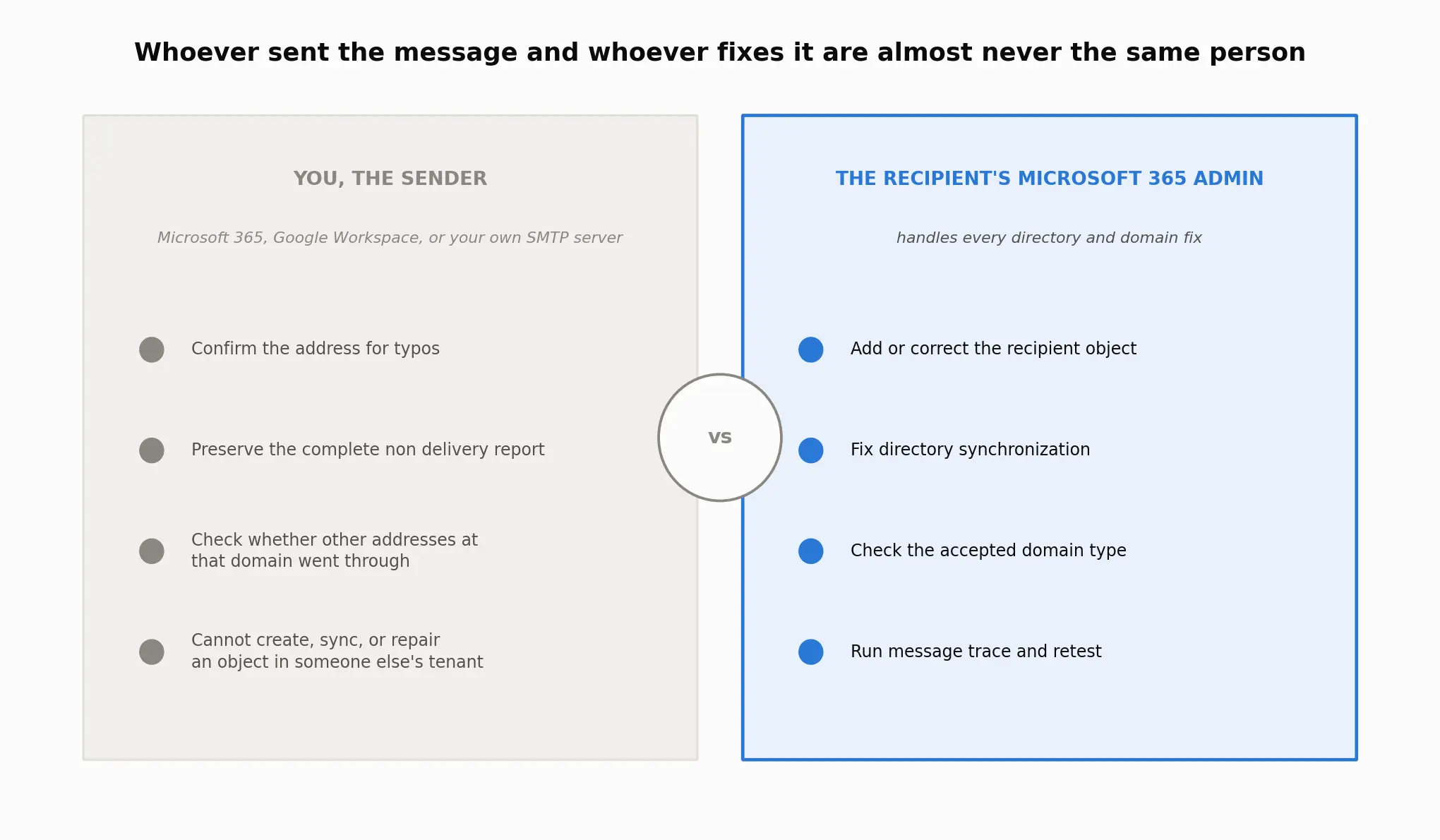
As the sender, on Microsoft 365, Google Workspace, or anywhere else, you cannot create, sync, or repair an object inside someone else's tenant. That side of it always belongs to the recipient's administrator.
What to send the recipient's admin
Before contacting them, put together:
The complete non delivery report, including everything after
AS(The exact recipient address you tried, copied rather than retyped
The date and time of the attempt, in your own time zone and in UTC
Whether other addresses at the same domain went through in the same window
Your sending IP address, only if you suspect a blocklist rather than a directory issue
What one real support thread shows
A Microsoft Q&A thread on this exact bounce, opened by a sender trying to reach Office 365 support directly, drew more than ten people confirming the same question with no built in path to a human.
The moderator pointed toward the recipient's own DNS and directory setup first, and toward a Microsoft 365 admin center service request only if that came back clean, worth following before assuming a blocklist.
Related 550 and bounce error codes
This is one of five common 550 subcodes worth telling apart, not the only one. The full breakdown of 550 permanent failure for one or more recipients covers 5.1.1, when the address plainly does not exist, and 5.7.26, when SPF, DKIM, or DMARC failed to pass, both of which read in a completely different way from the directory rejection covered here.
A related but distinct bounce, 554 5.7.1 Recipient address rejected: Access denied, shares the "Access denied" phrase but is a DMARC alignment failure rather than a directory lookup, and the fix runs through authentication records, not the recipient's directory.
If your bounce carries 554 instead of 550, or a 5.7 code instead of 5.4.1, the 550 5.7.1 blocklist and reputation section is the closer match.
Where TrueEmailer fits into this
TrueEmailer's own tools don't touch this particular bounce, since the rejection happens on the recipient's Microsoft 365 directory, somewhere no sending platform can reach.
Where it does help is ruling out Cause 5 before you waste time on it: TrueEmailer configures SPF, DKIM, and DMARC for a sending domain and runs mailbox warmup, so authentication and reputation are already confirmed clean before you go chasing a blocklist that this particular bounce was never actually about.
FAQ
Is this always a Microsoft 365 error, or can it happen when I send from Gmail or Google Workspace?
The rejection always happens on the recipient's Microsoft 365 side, but the sender can be on any platform.
Threads on the Google Workspace Admin Community show senders on Gmail and Google Workspace hitting this identical bounce when the recipient's Microsoft 365 tenant has the directory problem, so being on Google's side does not rule this cause out.
Can SPF, DKIM, or DMARC cause or fix this exact bounce?
No. This string is a directory lookup rejection, not an authentication failure. A different bounce, most often one carrying a 5.7 code such as 554 5.7.1, is where SPF, DKIM, and DMARC actually matter.
Should I retry sending the same message?
Only after the recipient's administrator confirms a change and one Entra Connect sync cycle, about 30 minutes, has passed. Retrying immediately with no change made produces the identical bounce again, nothing more.
What does AS(201806281) actually mean?
It identifies the internal DBEB rejection rule that Microsoft's system applied, not a case number, ticket, or a code you can look up on a public status page.
Can I still send to other people at the same domain while this is happening?
Usually yes, if the failure matches Cause 1, 2, or 4, since those affect specific objects rather than the whole domain. If every address at that domain bounces, you're more likely looking at Cause 3, the domain wide accepted domain or migration issue.
What if the failing address is a shared mailbox, distribution list, or public folder?
That points directly at Cause 4. Shared mailboxes usually sync like ordinary mailboxes, but public folders and dynamic distribution groups follow different sync rules and need a separate fix on the recipient's side.
What to remember before you retest
Every cause above except a plain typo lives inside the recipient's Microsoft 365 directory, not yours, no matter which platform you sent from. Rule out the typo first, since it costs nothing to check.
Then match your symptom to the table at the top, hand the recipient's administrator the evidence list above, and give any real fix a full 30 minute sync cycle before you decide it didn't work.
Error strings and fixes verified September 4, 2026 against Microsoft Learn, Microsoft Support, and RFC 3463.