

Cold mail is rejected or sent to junk when it breaks a written provider rule. Google counts a sender as bulk at close to 5,000 messages a day to personal Gmail accounts.
Microsoft applies its Outlook.com rules above 5,000 a day. Yahoo states no daily figure.
A cold list can fall under all three rules, one of them, or none. The rejection line shows which.
550 5.7.26 This email has been blocked because the sender is unauthenticated.
421 4.7.28 Gmail has detected an unusual rate of email originating from your IP address ip-address.
550; 5.7.515 Access denied, sending domain [SendingDomain] does not meet the required authentication level.
550 5.7.515 Access denied, sending domain <domain> does not meet the required authentication level.
Short answer
Google's bulk sender rules count mail to personal Gmail accounts only. Google states they don't apply to Google Workspace recipients. Outlook.com adds authentication rules above 5,000 a day.
Yahoo requires a spam rate below 0.3%. For cold email deliverability, sort your list by recipient provider first, then read your spam rate.
Find your case
Two tools sort you. A table sets the three providers side by side. Five numbered lines then route you to a cause.
Which rules reach your list
Google states its sender requirements and enforcement apply only to mail sent to personal Gmail accounts. It also states the guidelines don't apply to messages sent to Google Workspace accounts.
Microsoft names Outlook.com accounts and Microsoft consumer email services. A cold list of company mailboxes hosted on Workspace sits outside Google's sender rules.
Google's FAQ page prints the scope sentence in its own words.
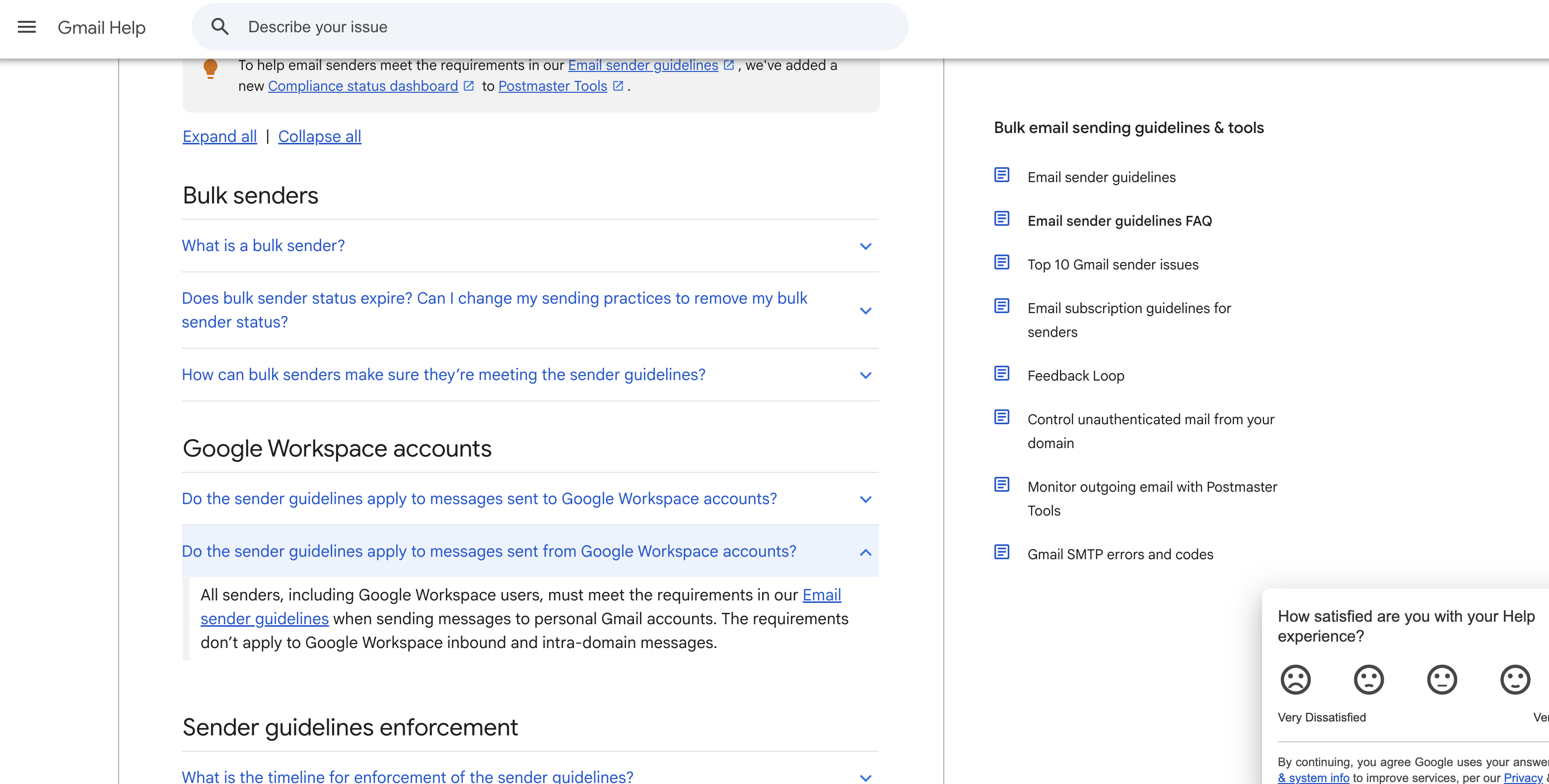
The statement covers the sender guidelines only.
The table below lines up what each provider states.
Rule | Yahoo | Microsoft (Outlook.com) | |
|---|---|---|---|
Start date | 1 February 2024, with stricter enforcement from November 2025 | From February 2024 | 5 May 2025 |
Volume line | Close to 5,000 messages a day to personal Gmail | No figure stated | More than 5,000 a day |
Authentication | SPF and DKIM | Both SPF and DKIM for bulk senders | SPF and DKIM must both pass |
DMARC minimum |
| A valid policy of at least | At least |
Spam rate | Below 0.1%, and never 0.3% or higher | Below 0.3% | No figure stated |
Microsoft's policy page says more than 5,000 a day. Microsoft Support says 5,000 or more, so staying under 5,000 clears both wordings.
Five lines that route you
Read the lines in order. Stop at the first one that fits.
If a bounce quotes
550 5.7.26,550 5.7.515or4.7.31, read cause 1.If you send close to 5,000 messages a day to personal Gmail accounts across all your domains and subdomains, read cause 2.
If Postmaster Tools shows a spam rate of 0.3% or higher on any day, read cause 3.
If sending stopped for up to a day, or a bounce quote
421 4.7.28or550 5.7.236, read cause 4.If your marketing or promotional mail has no
List-Unsubscribeheader, read cause 5.
If no line fits, go to the escalation section.
Cause 1: SPF, DKIM or DMARC fails (550 5.7.26, 550 5.7.515)
You are here if a bounce quotes 550 5.7.26 or 550 5.7.515or Outlook.com delivers your mail to junk.
What it means: The From domain failed the receiving provider's authentication level, so the message was refused or sent to junk.
Confirm it: Find the code in your bounce. Match its text to a line in the reference block further down.
Fix it: Publish SPF and DKIM for the From domain. Add a DMARC record of at least p=none that aligns with one of them.
The record steps are in how SPF, DKIM and DMARC are set up.
Takes effect: When resolvers drop the old record, which is the record's TTL. Send one test message after that time has passed.
Gmail: three versions of 550 5.7.26
Google's reference page lists three versions. The first says the sender is unauthenticated.
The second says the SPF record has a hard fail policy and the sending IP fails it. T
he third says the domain's own DMARC policy rejected the unauthenticated message and tells the sender to contact the domain administrator.
Google lists 4.7.31 for a DMARC record that names no policy.
Outlook.com: junk first, then 550 5.7.515
Microsoft states these rules took effect on 5 May 2025. Mail from a high-volume sender that misses them goes to the junk folder.
If the problem stays, Outlook.com may reject it with 550 5.7.515. SPF and DKIM must both pass. DMARC needs at least p=none and alignment with SPF or DKIM.
Microsoft lists alignment with both as preferred.
The DMARC minimum
Google, Yahoo, and Microsoft all name p=none as the lowest policy. Microsoft names p=reject as the recommended one.
A new cold sender meets the minimum with p=none.
Cause 2: you passed the bulk line without counting it (5,000 a day)
You are here if you send close to 5,000 messages a day to personal Gmail accounts. Count every domain and subdomain you use.
What it means: Google's bulk sender rules apply to your domain, and the status does not expire.
Confirm it: Sort a send log by recipient provider. Total the personal Gmail messages for each 24 hours, across every domain that shares your primary domain.
Fix it: Meet the bulk rules from the first send. They cover authentication, a DMARC record, one click unsubscribe for marketing mail and a low spam rate. Splitting volume across subdomains doesn't lower the count.
Takes effect: Google states bulk sender status has no expiration date. Changes in your practices don't remove it.
How Google adds up the 5,000
Google counts all messages sent from the same primary domain. Its own example uses one domain and one subdomain.
2,500 messages a day from the main domain.
2,500 messages a day from a subdomain.
2,500 + 2,500 = 5,000.
Google calls that sender a bulk sender, because all 5,000 came from one primary domain. Mailboxes work the same way.
Example: ten mailboxes on one primary domain each send 500 messages a day to personal Gmail accounts. 10 × 500 = 5,000.
New domains and the November 2025 change
Google defines a new domain by volume. It is a domain that has not sent more than 5,000 emails a day to personal Gmail accounts since 1 January 2024.
Google places new domains on an accelerated enforcement timetable. From November 2025, Google states it is ramping up enforcement, with temporary and permanent rejections.
A fresh cold sending domain that reaches the bulk line is on that faster timetable.
Cause 3: spam rate at or above the line (0.1%, 0.3%)
You are here if Postmaster Tools shows a spam rate of 0.3% or higher on any day.
What it means: Google names 0.1% as the level to stay under and 0.3% as the level to never reach. Since June 2024, a bulk sender above 0.3% is ineligible for mitigation.
Confirm it: Open the spam rate chart in Postmaster Tools. Google calculates and updates it daily.
Fix it: I'd pause the lists that draw the most spam reports first. Keep volume low while the chart recovers.
Takes effect: Google restores mitigation eligibility after the rate stays below 0.3% for 7 consecutive days.
Yahoo: below 0.3% of inbox mail
Yahoo requires a spam rate below 0.3%. It calculates the rate from mail delivered to the inbox. Example: 1,000 messages reach Yahoo inboxes and each spam report counts once.
1,000 × 0.3% = 3 reports.
3 reports sit on the line.
2 reports is 0.2%, which is under it.
Microsoft: no stated figure
Microsoft's policy page gives no spam rate figure. It names two free services for managing outbound IP reputation: the Junk Email Reporting Program and Smart Network Data Services.
Cause 4: a platform limit or Gmail's rate limit (421 4.7.28, 550 5.7.236)
You are here if sending stopped for up to a day, or you get bounce quotes 421 4.7.28 or 550 5.7.236.
What it means: A volume limit was reached, either on the sending platform or at Gmail.
Confirm it: Compare your daily message and recipient counts to the table below.
Fix it: Send less per mailbox and ramp up slowly. A warm-up plan with daily limits by setup lists the steps.
More mailboxes on one primary domain still add to the 5,000 count in cause 2.
Takes effect: A Workspace block lasts up to 24 hours. Exchange Online resumes when the recipients in the past 24 hours fall below the limit. After 4.7.28, wait at least 10 minutes.
Published limits for Workspace and Exchange Online
The table lists the limits both platforms publish.
Setup | Limit | At the limit |
|---|---|---|
Google Workspace, paid user | 2,000 messages a day | Sending stops for up to 24 hours |
Google Workspace, trial user | 500 messages a day | Limits rise after $100 USD is paid in total, up to 75 days later |
Google Workspace, mail merge | 1,500 messages a day | Sending stops for up to 24 hours |
Microsoft 365 (Exchange Online), one mailbox | 30 messages a minute and 10,000 recipients per 24 hours | Excess submission is throttled; sending stops until the 24 hour recipient total drops below the limit |
Microsoft 365 (Exchange Online), default onmicrosoft.com domain | 100 external recipients per organization in a rolling 24 hours | Senders receive |
Google states that after a limit is reached, "users can't send new messages for up to 24 hours." One Google message can carry 2,000 addresses.
No more than 500 of them can be external. Microsoft Learn states Exchange Online isn't suited to bulk mailing.
Google's limits article shows the paid and trial numbers in one place.
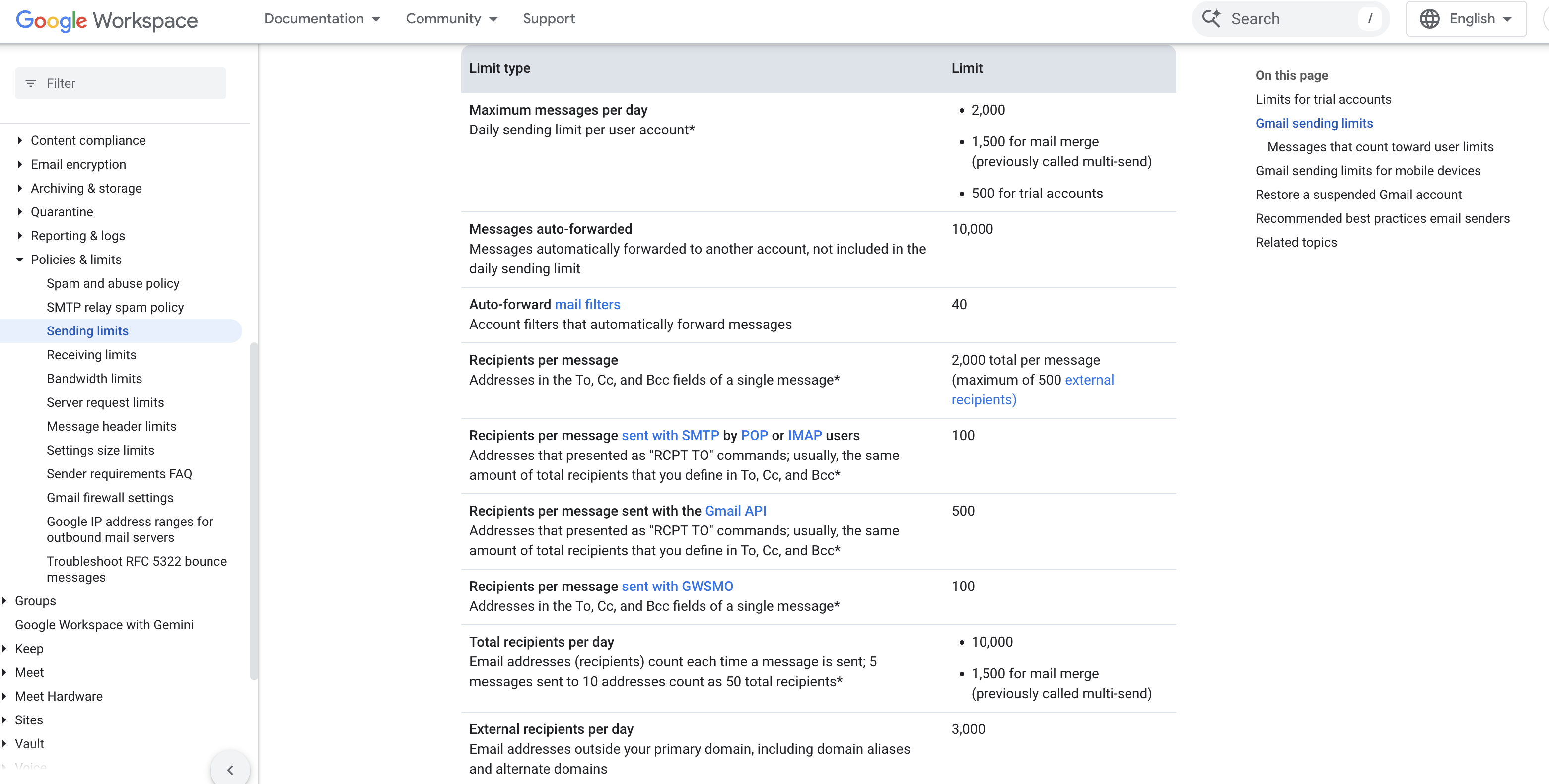
Paid users get 2,000 a day and trial users get 500.
421 4.7.28: stop, then restart on one connection
Google ties 4.7.28 to exceeding a limit. The Workspace error reference words it as an unusual rate of email. Google's restart steps:
Do not send for at least 10 minutes.
After 10 minutes, send from a single connection.
If that connection fails, wait another 10 minutes.
If it works, add connections one at a time.
If messages bounce or defer, cut volume until the error rate falls.
Example at the full Exchange Online rate
Example: one recipient per message, sent at the full 30 messages a minute.
30 × 60 = 1,800 messages an hour.
10,000 ÷ 1,800 = 5.6 hours.
The recipient limit arrives before the day ends.
Cause 5: no one click unsubscribe header
You are here if your marketing or promotional mail has no List-Unsubscribe header. A mailto link or a link in the body alone doesn't meet Google's rule.
What it means: Google and Yahoo both list a one click unsubscribe header as a requirement for marketing mail.
Confirm it: Open the raw headers of a sent message. Look for List-Unsubscribe and List-Unsubscribe-Post.
Fix it: Add both headers and sign them with DKIM. I'd add them to any cold sequence that reaches personal Gmail at volume.
Takes effect: Google's page lists no waiting period for new headers. Send one test message and read its headers.
RFC 8058 shows both headers in section 8.1 and requires the DKIM signature to cover them.
List-Unsubscribe: <https://example.com/unsubscribe/opaquepart>
List-Unsubscribe-Post: List-Unsubscribe=One-Click
Google: one HTTPS URL
Google requires one HTTPS URL in the header for marketing and promotional mail. A mailto link doesn't meet the one click rule, and a link in the body doesn't either.
Transactional messages are excluded. Google sets 48 hours as the time to honor requests. Its page doesn't say whether cold sales mail counts as marketing.
Yahoo: mailto is accepted
Yahoo accepts mailto as the unsubscribe method and calls the RFC 8058 POST method highly recommended. Requests must be honored within 2 days. A clearly visible unsubscribe link must also appear in the body.
What the receiving server saw
Google prints the reply code, status code and message text in separate columns. The lines below read left to right and show each message as it opens.
Microsoft prints one line. Its support article shows <domain> and no semicolon.
Google, 550 5.7.26
550 5.7.26 This email has been blocked because the sender is unauthenticated.
550 5.7.26 The (E)MAIL FROM domain [domain-name] has an SPF record with a hard fail policy (-all)
550 5.7.26 Unauthenticated email from domain-name is not accepted due to domain's DMARC policy.

Google, 421 4.7.28
421 4.7.28 Gmail has detected an unusual rate of email.
421 4.7.28 Gmail has detected an unusual rate of email originating from your IP address ip-address.
421 4.7.28 Gmail has detected an unusual rate of unsolicited email originating from your IP Netblock ip-address.
421 4.7.28 Gmail has detected an unusual rate of unsolicited email originating from your DKIM domain domain-name.
421 4.7.28 Gmail has detected an unusual rate of unsolicited email originating from your SPF domain domain-name.
421 4.7.28 Gmail has detected an unusual rate of unsolicited email containing one of your URL domains.
421 4.7.28 Gmail has detected an unusual amount of unsolicited email originating from your IP address.
421 4.7.28 Gmail has detected this sender exceeded the quota for sending messages that have the same Message-ID:.

Microsoft, 5.7.515
550; 5.7.515 Access denied, sending domain [SendingDomain] does not meet the required authentication level.
550 5.7.515 Access denied, sending domain <domain> does not meet the required authentication level.

Microsoft, default domain limit
550 5.7.236
Five of the 4.7.28 versions name a sending source: an IP address, an IP netblock, a DKIM domain or an SPF domain. One names your URL domains.
One concerns messages that share a Message-ID. Match your bounce to one line, then read its cause.
Codes 5.7.26 and 5.7.515 point to cause 1. Codes 4.7.28 and 5.7.236 point to cause 4.
The wider system behind these reply codes is laid out in SMTP error codes explained.
Escalation: when none of the lines fit
A passing DMARC result can sit beside a failing DKIM result. A Microsoft Community Hub thread from August 2026 shows it. The poster reported SPF pass, DKIM fail, and DMARC pass, and Outlook.com still returned 550 5.7.515.
The thread has 2 replies and is marked solved. The reply pointed to the failing DKIM and told the poster to compare headers from two clients. That fits Microsoft's rule that SPF and DKIM must both pass.
If authentication passes at the receiver and your rates are low, the pages linked above state no further numeric test.
Microsoft states no spam figure, and Google exposes one chart. Keep the redacted bounce text and the full headers of the failing send. They are the evidence any provider contact needs.
Confirmation: what success looks like
New sends show no
5.7.26or5.7.515after the DNS change has had time to spread.A test message's
Authentication-Resultsheader shows pass for SPF, DKIM, and DMARC.Postmaster Tools shows a spam rate below 0.3% for 7 days in a row.
No
421 4.7.28or550 5.7.236has appeared since your last volume change.Marketing mail carries
List-UnsubscribeandList-Unsubscribe-Post.
Postmaster Tools draws the spam rate as a daily chart.
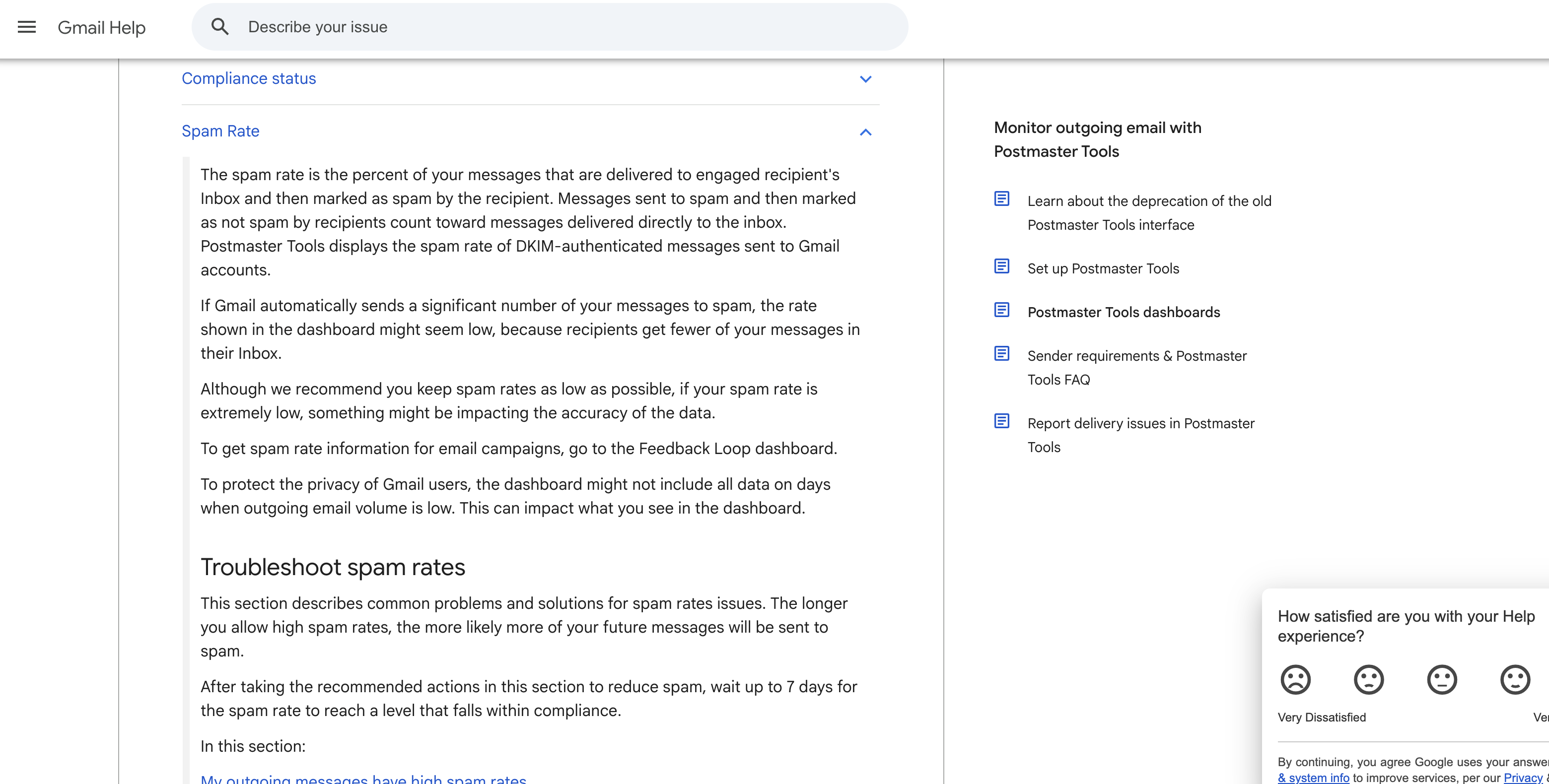
Seven days under 0.3% is the line Google names for mitigation.
Related error codes
What a Gmail message blocked notice says covers 4.7.28 and 5.7.26 inside the Gmail wrapper.
SMTP error 421 and when it retries cover the retry side of the 4xx replies.
How TrueEmailer supports cold email deliverability
TrueEmailer covers three of the five causes in this guide at the sending stage.
TrueEmailer is an email platform for writing, personalizing, delivering, and tracking campaigns. Contacts come in from a manual list, a CSV file, or the API, and mailboxes connect over SMTP.
The platform shows sent, delivered, failed, and pending counts per mailbox and per campaign, so each cause below can be checked against the numbers for the mailbox that sent the mail.
Cause in this guide | What TrueEmailer provides |
|---|---|
Cause 1: SPF, DKIM or DMARC fails | SPF, DKIM and DMARC records generated for your domain and verified continuously, then checked again on every send. Free SPF, DKIM and DMARC generators. |
Cause 3: spam rate at or above the line | A spam check that scores subject line triggers, link domains and image-to-text ratio, plus seed tests to Gmail, Outlook, Yahoo and Mail.ru. Blacklist sweeps on a schedule. Hard bounces, unsubscribes and spam complaints are excluded from every future campaign. |
Cause 4: a platform limit or Gmail's rate limit | Managed warm-up that climbs from 10 a day to 40 over 42 days. A reputation score out of 100 per mailbox, with warmup or a campaign paused when a score dips. |
The 5,000 a day bulk line and the spam rate lines apply to mail sent from any platform. Sending through a platform does not change what Google, Yahoo and Microsoft require.
You can try TrueEmailer free and run the three generators before the first send.
FAQ
Do cold emails go to spam by default?
The published rules test authentication, volume, spam rate and unsubscribe headers. They set no separate test for cold mail.
How many cold emails can one mailbox send a day?
The pages linked above give no safe daily figure for cold mail. They publish platform limits, listed in cause 4.
Do more mailboxes on one domain avoid the bulk line?
No. Google adds every message from one primary domain into one total, so mailboxes on the same domain share the same count.
Why did cold email deliverability suddenly drop?
Three documented triggers fit a sudden drop. They are crossing the bulk line, a spam rate at 0.3% or higher, and Gmail's enforcement ramp since November 2025. The five numbered lines in the diagnosis section sort them.
Which number to hold first
Start with the recipient count. If most of your list sits on company mailboxes hosted by Google, Google's sender rules don't reach it. If personal Gmail or Outlook.com addresses make up a large share, hold SPF and DKIM first.
Keep the Google spam rate under 0.1% next, and the daily count of personal Gmail messages under 5,000 per primary domain. If a bounce quotes a code, go straight to its cause.
Error strings and fixes verified on 15 October 2026 against Google's Email sender guidelines FAQ and Gmail SMTP error references.