

Message blocked
Your message to [recipient] has been blocked. See technical details for more information.
Those two words carry no diagnosis. "Message blocked" is Gmail's client side label, nothing more. Underneath it sits one of roughly nine real codes, things like 550 5.7.1, 550 5.7.26, or 552 5.7.0, each with a different cause and a different fix.
Find yours first. Open the bounce reply or the Show original view, then match the three digit number and the code after it to a cause below. Daily limits differ too.
Free Gmail, Google Workspace, and bulk senders each answer to a different cap, which changes which fix applies to you. The graphic below lays out what sits underneath that summary, layer by layer.
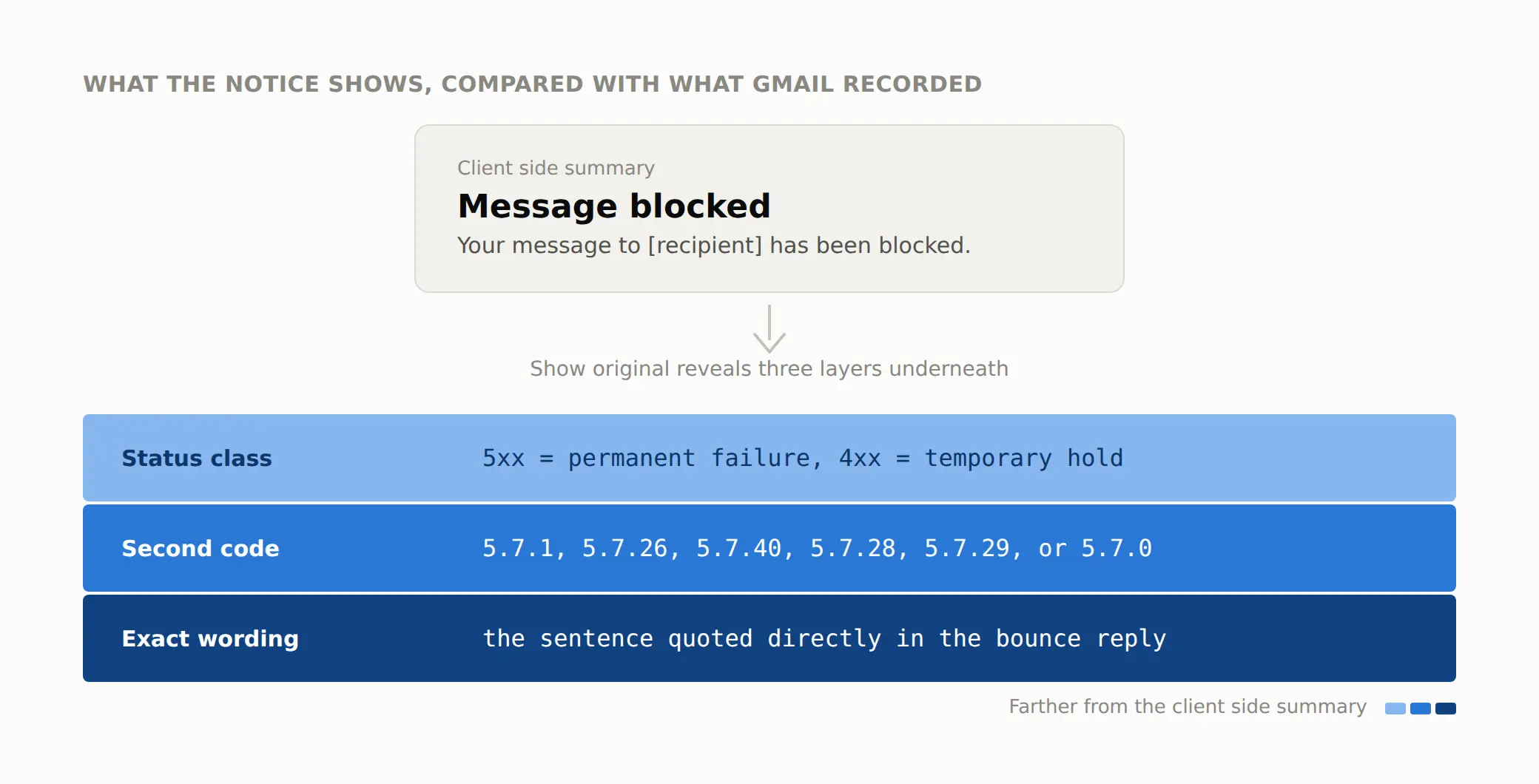
Every fix on this page keys off the middle and bottom layers, the code with three numbers in it and the sentence attached to it, not the two words on top.
Which of these matches what happened to you?
What you are seeing | What it indicates | Read this section |
|---|---|---|
An automatic reply arrives within seconds, starting with 550 | A permanent rejection. Gmail will not retry this message on its own | Where the message stalled |
An automatic reply arrives starting with 421 or 450 | A temporary hold. Gmail queues the message and retries later | What the receiving server logged |
No bounce at all, and the recipient says nothing arrived | Likely filtered to the spam folder, a different problem from a block | FAQ: how a block differs from spam |
The bounce names a policy or a rule rather than a reputation problem | A recipient side setting, not something your sending fixes | The recipient's own policy |
It happens on every Gmail address you send to, not one mailbox | A domain or IP level signal, not a single recipient quirk | The volume and rate check |
What did the receiving server log?
The word "blocked" tells you Gmail rejected the message. It does not tell you why, and reading only that word is the step that wastes the most time.
Open the real response, not the summary
Open the message in your Sent folder, choose Show original, and look at the raw response instead of the two word summary Gmail shows first.
That view is where the real code lives, several lines below the short summary Gmail shows by default. The line you want starts with a three digit number. RFC 5321 splits that number into a simple pair: a leading 4 means a temporary failure, and a leading 5 means a permanent one.
The specification puts it plainly: "The command was rejected, and the action did not occur." A 4xx code is worth retrying once the cause is fixed. A 5xx code will not clear on its own no matter how many times you resend the same message.
Read the second code, not the first
Underneath the three digit number sits a second code in the form X.7.Z or X.4.Z, and that second code is what separates one cause from another. Two examples, both pulled directly from Google's own reference for Gmail SMTP errors:
550 5.7.1 The user or domain that you are sending to (or from) has a policy that prohibits the email that you sent.
421 4.7.28 Gmail has detected an unusual rate of unsolicited email originating from your IP address.
Same wrapper, two completely different problems. The 550 permanent failure family that Gmail files every 5xx code under starts exactly here, at the second code, not at the word "blocked."
Where did the message stall?
A message headed for a Gmail inbox passes through several stages in order, and "message blocked" can fire at any one of them. Match your exact code to the stage below instead of working through every fix on this page. The graphic below lines up all five stages in order, with the code attached to each one.
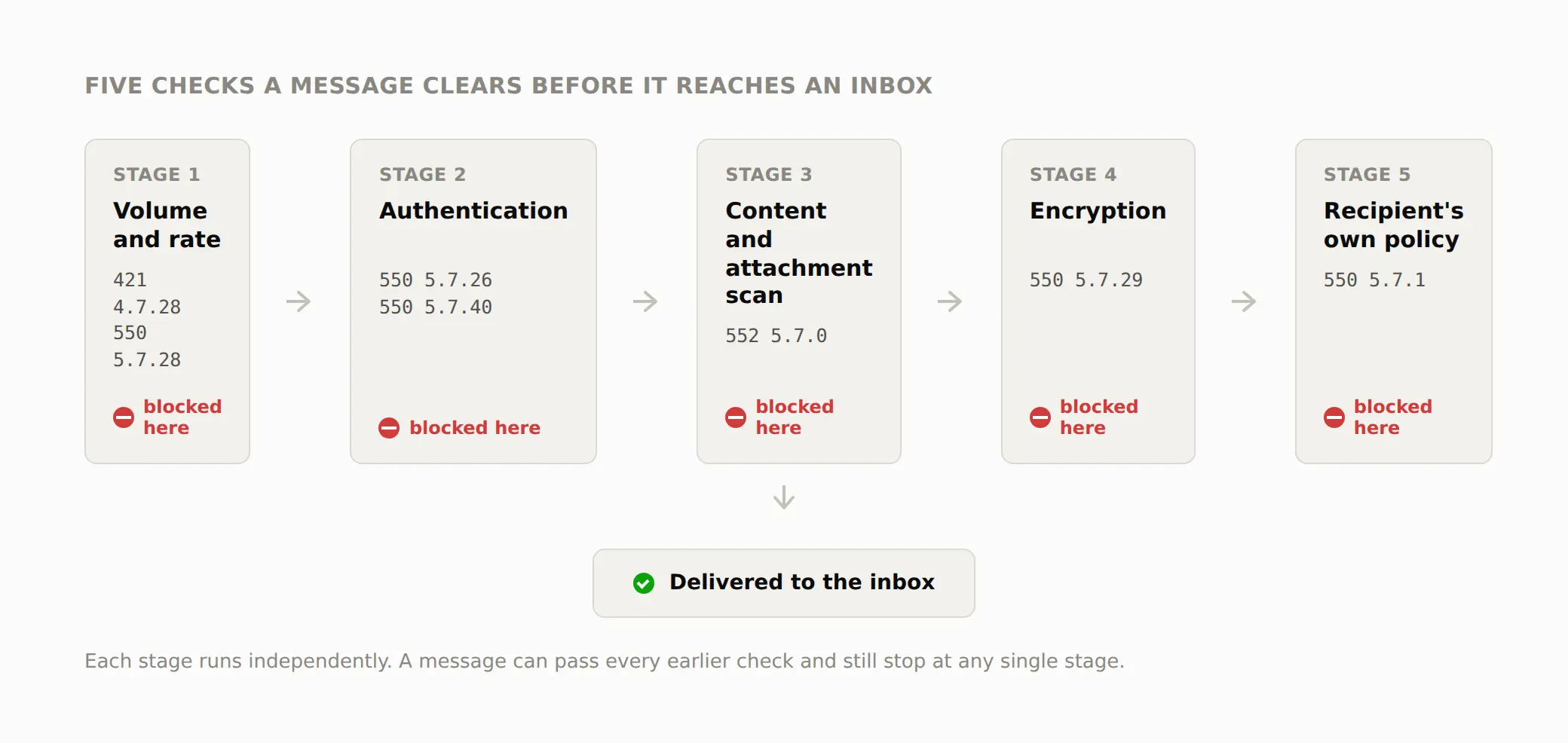
Only one stage will match the code in your own bounce. The headings that follow keep this same order, so jump straight to the one that fits.
The volume and rate check
What it means: Gmail compares how much mail your IP address or domain sends against what it has seen from you before. A sudden jump trips this response even when nothing else is wrong.
Confirm it: The bounce reads 421 4.7.28 or 550 5.7.28, and it names a rate rather than a policy or a missing record.
550 5.7.28 There is an unusual rate of unsolicited email originating from your IP address.
Fix it: Cut your sending volume back to whatever level worked before the spike, then rebuild it over days rather than hours.
If you share an IP address with other senders, this can trigger from their volume, not yours, and there is little you can confirm about that from your side alone.
Takes effect: Gmail's own reputation signals are rolling averages, not a single snapshot, so a lower rate usually needs 24 to 48 hours of steady sending before the block clears, not the next message you send.
The authentication check
What it means: Gmail verifies whether your message can prove it came from the domain it claims to. SPF, DKIM, and DMARC each answer a different part of that question, and a gap in any one of them can produce this stage of block.
550 5.7.26 This email has been blocked because the sender is unauthenticated.
550 5.7.40 Your message was blocked because the sending domain doesn't have a DMARC record.
Confirm it: The bounce mentions authentication, DKIM, or a DMARC policy directly, rather than volume or content.
Fix it: Publish SPF and DKIM for the exact domain in your From address, then add a DMARC record even if you set its policy to p=none at first. A missing DMARC record on its own, with no failing SPF or DKIM, is enough to trigger 550 5.7.40.
The five causes behind a 5.7.1 bounce walks through SPF authorization gaps in more detail than fits here.
Takes effect: DNS changes follow the TTL on the record you edited. A short TTL of 300 seconds clears in minutes; the default TTL many registrars ship with is closer to an hour, so retest against the clock, not against guesswork.
The content and attachment scan
What it means: Gmail scans message content and attached files for the same signatures it uses against malware and phishing, separate from anything about your domain's reputation.
552 5.7.0 This message was blocked because its content presents a potential security issue.
Confirm it: The bounce mentions a security issue or content risk rather than a rate or an authentication failure, and it usually points at one specific message rather than every message you send.
Fix it: Remove the flagged attachment type, most often an executable, a script, or a password protected archive, and resend without it. If the file is a legitimate business document, host it and link to it instead of attaching it.
Takes effect: This scan runs per message, so a resend without the flagged file clears it immediately. It carries no reputation penalty on its own.
The encryption check
What it means: Gmail expects an encrypted connection for the SMTP session itself, separate from any encryption inside the message.
550 5.7.29 This message was blocked because it wasn't sent over a TLS connection.
Confirm it: The bounce names TLS or an encrypted connection specifically.
Fix it: Turn on opportunistic TLS in your sending server or email platform's SMTP settings. Most modern mail servers and every major sending platform support this by default, so this usually points at an older on premises mail server or a custom script sending raw SMTP.
Takes effect: Immediate, on the next connection attempt, since this is evaluated per session rather than tracked over time.
The recipient's own policy
What it means: Someone controlling the receiving domain, often a company's Google Workspace administrator, has set a rule that rejects your message on their end. Nothing about your domain's reputation caused this.
550 5.7.1 The user or domain that you are sending to (or from) has a policy that prohibits the email that you sent.
Confirm it: The bounce specifically says "policy" rather than naming a rate, an authentication gap, or content. It also tends to affect one recipient's organization rather than every Gmail address you send to.
Fix it: Ask the recipient to look in their own admin console for a compliance or content rule matching your domain, sender, or subject line. Warming up your domain, fixing SPF, or reducing volume will not change a rule set on the other side.
Takes effect: As soon as their administrator adjusts the rule, since the rule runs against their own policy rather than any external signal about you.
How do you confirm the fix holds?
Resend the same message to the same address once. Sending it several times in quick succession after a rate related block can extend the exact cooldown you are trying to clear. Watch for a clean 250 response instead of another bounce.
Confirm the new message still carries a passing Authentication Results header if the cause was authentication.
Which rulebook applies to you also depends on where you send from, and mixing them up is its own source of confusion:
Sender type | Daily volume threshold | Authentication required |
|---|---|---|
Free Gmail account | 500 messages | SPF or DKIM recommended, not enforced |
Google Workspace, standard sending | 2,000 external messages | Same baseline as free Gmail |
Any sender exceeding 5,000 messages a day | 5,000 messages triggers bulk rules | SPF, DKIM, and DMARC all required, plus one click unsubscribe headers |
A rising line on that chart is the earliest warning a rate related block is coming. Google's own bulk sender guidance sets 0.3 percent as the hard ceiling, and separately recommends keeping the rate Postmaster Tools reports below 0.10 percent day to day.
The 0.3 percent line is already close to where enforcement begins, not a safe cruising speed.
What already closes the authentication gap?
Most of the causes on this page trace back to one gap: missing or incomplete authentication. TrueEmailer sets up SPF, DKIM, and DMARC together the moment it onboards a domain, rather than leaving each record to be added separately over time.
That closes the exact gap behind codes like 550 5.7.26 and 550 5.7.40 before a message ever gets sent. A domain with all three records already in place has nothing left for Gmail's authentication check to catch.
It does not touch the other four causes here. Volume and rate, content and attachment scanning, the TLS requirement, and a recipient's own policy rule all sit outside what a sending setup alone can fix, and no tool changes that.
Related error codes
550 5.4.1 is a different family entirely, a rejection of the address itself rather than the message. The access denied breakdown explains who owns the fix. 554 5.7.5 sits one level deeper than the missing DMARC record covered above.
It is the DMARC evaluation failure itself, not an absent record. The full DMARC evaluation guide covers the duplicate records and syntax faults that a bare 550 5.7.40 will not catch. 550 5.1.1 is covered in the hub linked above.
What if it's none of the above?
If the bounce does not match any code above, or a Google Workspace administrator on the receiving end cannot find a matching rule either, Google's own bulk sender contact process is the remaining option, not a support ticket with a guaranteed answer.
A recent community thread about this exact rejection ended the same way twice over: two separate advisors pointed the sender at reputation and Postmaster Tools instead of a quick resend, since neither expected a restart alone to change the outcome.
Deliverability writer Al Iverson has covered Gmail's sender tools for years. After testing the sender contact form, he put it plainly: "In almost all cases, it will not garner a response, but Google says that they do review all submissions." He also notes it can take weeks to see any change, and that the form changes nothing about a genuine authentication or content problem on its own.
Before you use the contact form
Confirm each of these first:
Every code above has been matched against your actual bounce text, not assumed from a search result
SPF, DKIM, and DMARC all pass on a fresh test message
The block affects more than one recipient, not a single administrator's local rule
At least 48 hours have passed since your last sending change, since Gmail's reputation signals need that long to reflect a fix
FAQs
What does "message blocked" actually mean in Gmail?
It means Gmail rejected the message. It is showing you its own short label instead of the real code. The actual reason sits in the technical details underneath, in a three digit SMTP code followed by a second code like 5.7.1 or 5.7.26.
How is a block different from being sent to spam?
A block stops the message before Gmail accepts it, and produces a bounce back to the sender. Spam filtering happens after Gmail has already accepted the message, and the sender gets no bounce at all, since delivery still technically succeeded.
How long does it take to recover once the cause is fixed?
Content and TLS fixes clear on the next message you send. An authentication fix follows your DNS record's TTL, usually minutes to an hour. A rate or reputation related block is the slowest, often 24 to 48 hours of clean, steady sending before it lifts.
Can I keep sending to other providers while Gmail is blocking me?
Yes. A Gmail specific block, especially the recipient policy and content scan types, has no connection to how Outlook, Yahoo, or any other provider treats your mail.
A rate or authentication problem is more likely to show up elsewhere too. Review Postmaster Tools and your DNS records regardless of which provider flagged it first.
Read the code before you touch anything else
Every fix on this page starts with the same first move: find the actual code, not the two word summary Gmail puts in front of it. Two different problems can look identical from the outside. A rate issue and a recipient's own policy rule both show up as "message blocked," yet they call for completely different responses.
Spend the first minute reading the technical details. The rest of the fix usually takes less time than the search that brought you here.
Error strings and fixes verified 14 September 2026 against Google Workspace Admin Help's Gmail SMTP error reference, Gmail's consumer bounce message documentation, Google's bulk sender guidance, and RFC 5321.