

250 2.1.5 OK
421 4.7.0 Try again later
550 5.7.1 Message rejected
IANA's own registry of SMTP enhanced status codes now lists 63 entries, up from the 48 the original 2003 specification defined. Most SMTP error codes still settle into one of two outcomes though: the message went through, or it did not and nothing will change that without a fix on one end or the other.
A three digit number sets the class. A second code, three numbers joined by periods, names the exact reason.
This page reads both for you, in under a minute, then sends you to a full breakdown for the five specific codes this site has already covered in depth.
The 30-second way to read any code you receive
Two things showed up in your bounce or your log, not one. Separate them before doing anything else.
The first is a three-digit reply code, defined in RFC 5321. Its first digit is the only part that matters if you have never seen the exact number before.
First digit | Class | What it means | What to do |
|---|---|---|---|
| Success | The message was accepted | Nothing. Delivery happened |
| Intermediate | The exchange is not finished; another command is expected next | Nothing, this is mid conversation, not a failure |
| Temporary failure | The message was not accepted this time, but the address and content were not rejected outright | Wait, or fix a setting that is throttling you |
| Permanent failure | The message was refused and will keep being refused unless something changes | Fix the cause before you resend |
The second is an enhanced status code, three numbers separated by periods, such as 5.7.1 or 4.4.7. RFC 3463 defines this format as class, subject and detail: the first number repeats the 2, 4, or 5 class, the second names a category such as addressing or policy, and the third narrows it to one specific condition.
This is the part that does most of the explaining in a real bounce: why, not only whether.
Subject digit | Category | Covers |
|---|---|---|
| Addressing | Bad or ambiguous recipient address |
| Mailbox | Mailbox full, disabled, or over a size limit |
| Mail system | The receiving system itself is full or misconfigured |
| Network and routing | No answer, a bad connection, or a routing failure |
| Protocol | A command or syntax problem in the SMTP session itself |
| Content | The message body or an attachment could not be handled |
| Security and policy | Authentication, encryption or a policy rule blocked delivery |
RFC 3463 defines success as reporting "a positive delivery action," a persistent transient failure as one where "the message as sent is valid" but a temporary condition is holding it up, and a permanent failure as one unlikely to be fixed by sending the exact same message again.
Read the class first. Read the subject second. Everything below sorts by that pair.
Confirm you're reading the code correctly
A surprising number of tickets and forum posts turn out to be a misread code, not a real problem. Three checks catch most of them.
Find both numbers. A full bounce carries a three digit code and, in most cases, a three part enhanced code right next to it. If you only see one, you are likely looking at a summary, not the actual server reply.
Check who is speaking.
220is a greeting the server sends to you when a connection opens, not something your system sent out. Seeing it inside your own outbound log usually means a session trace, not a rejection.Rule out code
0. A reported error0or a blank status is not an SMTP code at all. It means the connection never reached the point where a real server reply came back, so the fault sits in the network path or the client library, not in the SMTP exchange.
Get this right before you touch a setting, since the fix for "the server rejected my message" and the fix for "my connection never opened" are not the same fix.
A real bounce usually puts both codes on the same line, right next to each other, which is the fastest way to confirm you have the right pair.
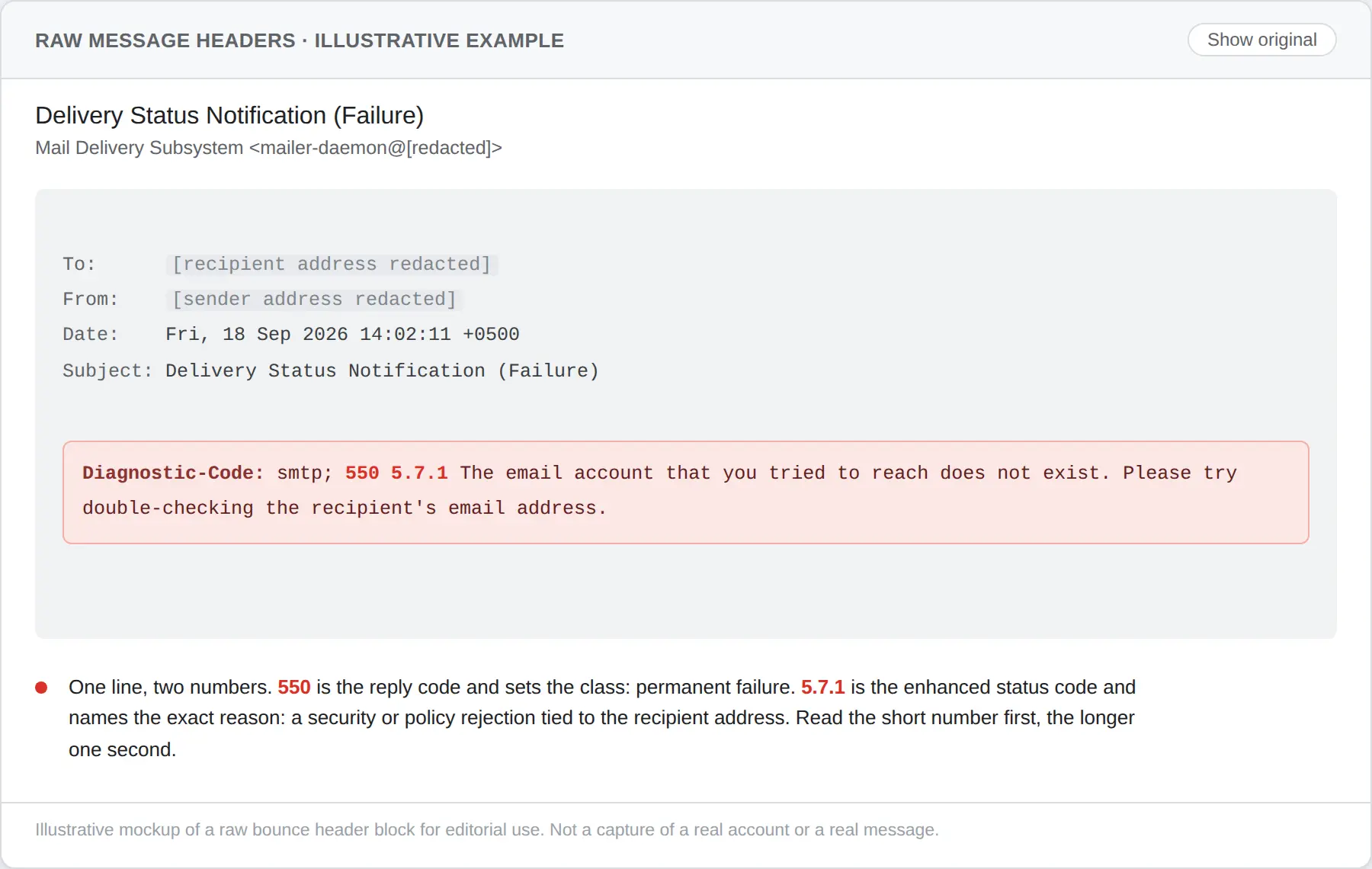
That single line is what the rest of this page sorts by: the short number for class, the longer one for the exact reason.
What changes if it's a 4xx
A 4xx code means the message is still queued somewhere and will be tried again automatically, on a schedule the sending system controls rather than the SMTP standard.
Rate and connection limits
Codes like 421 4.7.0 most often mean you, or whatever is sending on your behalf, opened too many connections or sent too fast for the receiving system's current limits.
Google's own sender guidelines separate a 0.3% hard block threshold from a 0.10% target for bulk senders, two different numbers several pages collapse into one.
The fix here is a setting: slow the send rate or space out the connections, not a DNS record.
Mailbox or system temporarily unavailable
450 and 452 usually mean the recipient's mailbox is temporarily full or the receiving system is short on storage right now. Nothing on your side is wrong.
Waiting is the correct action, since RFC 5321 gives senders roughly four to five days of retry window before a message is finally returned to the sender.
Soft policy holds
Some 4xx replies, including certain 450 and 451 variants, hold the message while a spam or reputation check runs, rather than reject it outright. These usually clear on their own within the retry window above.
What changes if it's a 5xx
A 5xx code means resending the identical message will not help. Something has to change first, and in most cases that something lives in DNS or in an authentication setting, not in a retry queue.
Recipient address rejected
550 5.1.1 and 550 5.4.1 both mean the receiving system has no matching mailbox for that address, though for different reasons: a straightforward bad address versus a routing or directory gap on systems like Google Workspace, most often surfacing after an account migration or a hybrid sync delay.
550 5.7.1 carries a wider spread of causes than either of those, from sender reputation to message formatting to authorization, and the full cause by cause breakdown of that code sorts out which one actually applies before any fix gets attempted.
Authentication or policy rejected
550 5.7.26, 550 5.7.40 and 554 5.7.5 all sit in the X.7.x security and policy category, and all three usually trace back to SPF, DKIM or DMARC rather than anything about the message content. The DMARC specific case, including why the record itself rather than the message is what fails, has its own dedicated walkthrough of 554 5.7.5.
Relay or access denied
554 5.7.1 phrased as relay access denied is a different problem from the identical looking 550 5.7.1 content rejection above: it means the receiving server will not forward mail for a domain it does not manage, usually because of an open or misconfigured relay setting on the sending side.
Content or attachment rejected
552 5.7.0 and 552 on their own generally mean the message or an attachment exceeded a size limit, or tripped a content scan.
This is one of the few 5xx causes that lives entirely in what you sent, not in DNS or authentication.
Why the wording changes depending on who sent it
The three digit code and the enhanced code are standardized. The sentence wrapped around them is not, and every major provider writes its own.
Provider | How it phrases a |
|---|---|
Gmail | Includes a bracketed sending IP inside the same line as the code |
Microsoft 365 | Often adds a support case number alongside the enhanced code |
Yahoo | Describes error categories such as excessive complaints or unknown recipients rather than quoting one fixed sentence for every cause |
Yahoo's own documentation puts it plainly: an SMTP error exists "either due to a temporary or permanent problem," and beyond that split, the exact phrasing is left to whichever system generated it.
A real thread on Cisco's own support community shows how far this can go: a person managing an email gateway needed the literal bracketed text the appliance was outputting, because the general documentation on hand did not match it closely enough for a script to match on.
Treat any exact sentence found in a guide as an example, not a guarantee, and match on the code, not the words around it.
What already closes the authentication gap behind these codes
Several of the codes above, specifically the authentication form of 5.7.1, 5.7.26, 5.7.40 and 5.7.5, trace back to a domain's SPF, DKIM or DMARC setup rather than anything about the message itself.
TrueEmailer has SPF, DKIM and DMARC configured together at setup on the domains it sends from, which removes that specific cause before it can show up in a bounce.
It does not touch the other buckets covered above: rate and connection limits, mailbox or storage capacity, relay authorization, or content and attachment size. Those still need the fixes described in their own sections.
The codes this reference already has full breakdowns for
Reading the class and the enhanced code tells you the category. A short list of specific codes already has a complete cause by cause diagnosis published, each with its own confirmation and escalation steps, for the cases where the category alone is not enough to act on.
The 550 5.4.1 and 550 5.7.1 pages linked above cover the two most common recipient rejections, and the 554 5.7.5 page linked earlier covers the DMARC specific policy failure.
Two more sit outside those categories. Gmail's generic notice gets decoded on its own page, since what actually sits behind a "message blocked" wrapper is one of several distinct codes hiding behind a single label.
The temporary side of the reference has its own page too, with a full breakdown of SMTP error 421 and how to tell whether it clears on its own or needs a fix first.
The broader 550 permanent failure family these sit inside has its own overview covering all four related enhanced codes.
When it's not something you can fix from your side
Some codes point squarely at the receiving system, and no setting change on your end will move them.
A 4xx that never clears after several days, a 5xx that names a policy you cannot see the exact text of, or a rejection tied to the recipient's own storage or spam settings all fall into this category.
Before contacting anyone, gather what an admin on the other end will actually ask for.
The exact three digit code and the full enhanced code, copied character for character
A timestamp for at least two separate attempts, so a pattern of "always" versus "sometimes" is clear
The literal wording the receiving server returned, not a paraphrase
Confirmation that SPF, DKIM and DMARC all currently pass for the sending domain
Whether the same message succeeds to a different address at the same receiving domain
The registry behind the enhanced code is public and worth having open while that list gets filled in, since it shows whether a code is current or has been superseded.
A code missing from that table entirely is worth flagging to the other side directly, since it usually means custom text from their own system rather than a standard reply.
A ticket built from that list gets answered faster than one that only says the message bounced.
FAQ for SMTP error codes
What does an SMTP error code actually mean?
It is the receiving mail server's own report of what happened to your message, made of a required three digit class and, in most real bounces, an added three part code that names the specific reason inside that class.
Is SMTP error code 0 a real error?
No. A real SMTP reply is always a three digit number from the server. Seeing 0 or a blank code means the connection or the client library never received a server reply to read, which points at the network path, not the mail server's decision.
What is an SMTP enhanced status code?
It is the three number, period separated code such as 5.7.1 defined by RFC 3463, layered on top of the older three digit reply code to explain the specific cause rather than only the class.
What are all the 4xx errors?
They are temporary failures: the message is still valid and still queued, and a later retry can succeed without anything being changed. 421, 450, 451 and 452 are the ones seen most often.
Why do two different providers show different text for the same code?
The three digit code and the enhanced code are standardized by RFC. The sentence around them is written by each provider separately, so the same 5.7.1 can read in three noticeably different ways between Gmail, Microsoft 365 and Yahoo while meaning the same thing.
Does an SMTP error code always mean the email failed?
No. 2xx and 3xx codes are not failures. 2xx means the message was accepted, and 3xx means the exchange is still mid conversation, with one more command still due from the client before either side settles it.
Where fifteen minutes of reading gets you
A class digit and an enhanced code are not a mystery once you know which is which. Most of what looks like sixty different problems collapses into four buckets: wait, fix a setting, fix DNS or authentication, or hand it to someone else.
The five linked breakdowns above cover the specific causes worth a full page of their own. Everything else on this reference should get you to the right bucket inside a minute.
Error codes and enhanced status meanings verified 18 September 2026 against RFC 5321, RFC 3463, the IANA Enhanced Status Codes registry, and Yahoo's own SMTP error documentation.